
Civic.ly is asset management software for UK parish and town councils. It combines an interactive asset map with scheduled inspections, defect reporting and maintenance jobs. If your council already has a digital map, Civic.ly can help you manage the work that needs to happen on those assets and keep a record of what has been done.
Whether you need another system depends on what your existing tools can do. If they already provide a reliable way to schedule checks, assign repairs and review completed work, you may not need another subscription. If those records are spread across paper checklists, emails and spreadsheets, it is worth looking at how you manage the work alongside the map.
What is the difference between asset mapping and asset management?
A digital map helps a clerk identify where the council's assets are. It is useful when planning grounds work, discussing local projects or finding the right bench when a resident reports damage. An asset management system also helps the council organise the work associated with those assets.
| Council requirement | What Civic.ly helps you manage |
|---|---|
| Locate a bench or playground | Find the asset on the map and open its record. |
| Organise routine checks | Assign inspections and set repeat schedules. |
| Record a problem | Raise a defect with a description and photograph. |
| Arrange a repair | Create a linked job with an assignee and due date. |
| Review completed work | See inspections, defects and jobs against the asset. |
Some mapping tools also include asset management features. The distinction is the workflow your council needs, rather than the label attached to a particular product. See What is Civic.ly?, the overview of the map and the asset and task model.
Can we use the asset data we already have?
Start with a sample from the existing register. Give each bench, bin or item of play equipment its own row, with its location and a reference that is unique across the council. If two parks both have a "Bench 1", include the park name in each reference. This makes it possible to match an inspection to the right bench later.
Check the sample on site. A single entry for six benches cannot tell the clerk which one has a loose slat. Record each bench separately and add its photograph. Keep useful information from the old register, such as purchase dates and costs, so it can be reconciled with the individual asset records.
If each row has coordinates or a what3words address, Civic.ly can review the file and, if suitable, import the records for you. If locations are missing, photograph the assets on site first and use the External ID field to match each record to its spreadsheet row. The council attaches the photographs in either case. See the guide to preparing an existing asset register.
Move from a mapped asset to a completed repair
Imagine that a council has a bench marked on its map at the recreation ground. The grounds team finds a loose slat during a scheduled inspection.
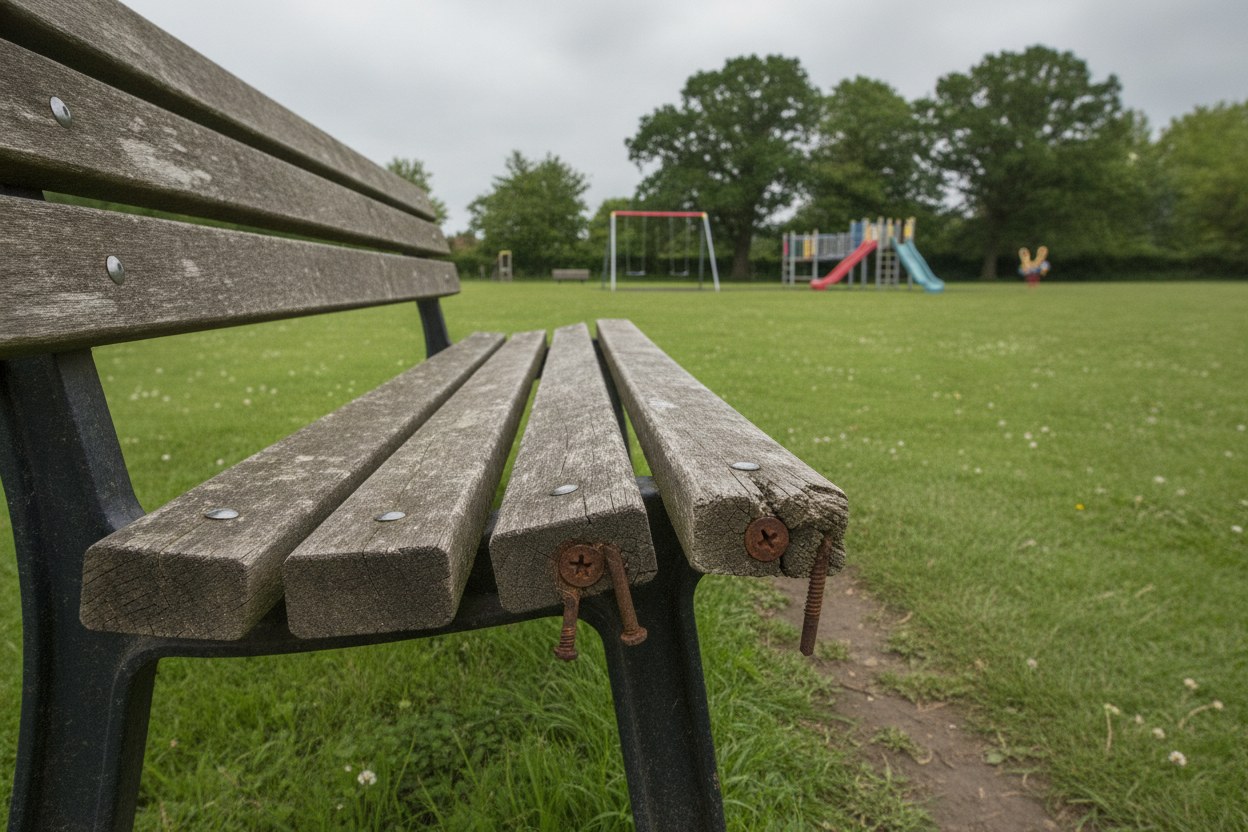
In Civic.ly, the inspection result is saved against the bench. The inspector can choose to raise a defect from the failed check and add a photograph. The clerk can then arrange a repair by creating a job linked to that defect. The job has an assignee and due date.
When the repair is complete, the council reviews the work and updates the defect separately. If the first visit was only to assess the damage, the issue can stay open until the repair has been carried out. The bench's record then helps the clerk trace the original check and the subsequent work.
See how to raise and manage a defect and the difference between inspections, defects, jobs and routines.
Organise inspections without waiting for the whole register to be finished
If the council is still checking purchase dates or replacement values, it does not need to finish every financial field before setting up operational checks. Once the relevant asset exists with its correct location and type, the team can schedule its inspection. Financial details can be completed separately without recreating the inspection schedule.
For groups of assets checked on the same timetable, Civic.ly lets the clerk create a routine. Inspections and maintenance jobs can share a routine while retaining their individual asset records. Staff complete the work in the mobile app and the results are available in the web app after synchronisation.
See the guide to setting up inspections before asset values are complete and how to create a routine.
Keep the right records in the right place
Your council may still need a mapping system for neighbourhood planning, public maps or other geographic information. Keep the tools and records that serve those purposes. Agree which system your staff will use for inspection results, open defects and repair records so that nobody has to guess where the latest information is held.
The council is responsible for checking asset ownership and maintenance responsibilities, setting inspection intervals and arranging specialist assessments where needed. Recording the work in software does not by itself establish that a council has met its safety obligations.
What to check before choosing asset management software
Ask the supplier to demonstrate a real workflow using one of your existing mapped assets. Can staff find the item, complete an assigned inspection, record a defect and see who is responsible for the repair? Can the clerk find the original result and review the finished work later? Ask how existing asset data can be brought across and whether any ongoing updates between systems need to be managed manually.
For more detail on scheduling checks across different assets, see our routine inspections and maintenance guide. Staff working out in the field can read how offline working behaves where there is no signal.
Explore Civic.ly's features or book a demo to discuss your existing register and inspection requirements.
Frequently asked questions
Civic.ly combines mapping with scheduled inspections, defects and maintenance jobs for parish and town councils. If your current system does not manage those workflows, dedicated asset management software can help. Assess what your existing tools already provide before choosing another system.
Your existing references and coordinates can help you identify the same assets in Civic.ly. Send a sample with one row per asset and ask Civic.ly to confirm which details can be carried across and what needs to be captured on site.
Yes. Staff can raise a defect against an asset when a problem is found, including from the option offered after a failed inspection item. A description and photograph help identify what needs attention.
Yes. Create jobs for agreed work and link them to defects where appropriate. Review the job result and update the defect status separately. Both records remain associated with the relevant asset.
Civic.ly lets councils start inspections and recurring jobs on correctly classified and located assets while the remaining financial details are being collected. Keep your existing accounting records until the council has reconciled them.
Open the mobile app while connected before the round so the assigned tasks download. Staff can then complete an inspection, record a defect and take photographs offline. The work stays on that device until it reconnects and syncs with the web app. Staff can check Sync Status before handing over to the clerk.