From playground inspection to completed repair, all in one place.
Civic.ly helps parish and town councils manage playground equipment, inspections, defects and repair jobs together. Grounds staff work from the mobile app; the clerk organises and reviews from the web app. Every problem can be followed from the inspection that found it to the repair that fixed it.
Used by more than 100 parish, town and community councils across England and Wales.
 John Fagan, Founder, Civic.ly · November 2026
The annual report has arrived. Now what?
Your annual independent inspection (often a RoSPA report) has landed. There are repairs to organise, routine checks to keep running, and records to find when an insurer, auditor or councillor asks what was done.
Most councils still manage this with paper forms, spreadsheets and email chains. Civic.ly puts the equipment, the checks and the repairs in one system, so nothing has to be pieced back together later.
Give each piece of equipment its own record.
Map your playground as an area, then add the individual assets inside it: swings, slides, climbing frames, gates and benches. A damaged swing chain is recorded on the swing, where its inspections and repairs can be reviewed together.
Choose the level of inspection evidence you need:
Whole-playground sweep
Records the general condition of the site. Quick, but it does not show that every individual item was checked.
Individual equipment inspections
Builds a dated record for each asset. Use these where you need evidence that a particular swing or slide was inspected.
Schedule checks your team completes on their phones.
Create an inspection, assign it to a team member, choose a checklist and set a due date. It appears in their mobile task list, and the results are ready to review in the web app. How to create an inspection.
Set inspections to recur, or group checks across several assets into a repeating round, with Civic.ly's scheduling tools.
Built-in play equipment checklists include quick visual checks and, for supported equipment types, detailed operational checks covering fixings, bearings, chains, anchors and impact surfacing. Explore operational checks.
Set inspection frequencies to suit your council's risk assessment, professional guidance and insurance requirements.
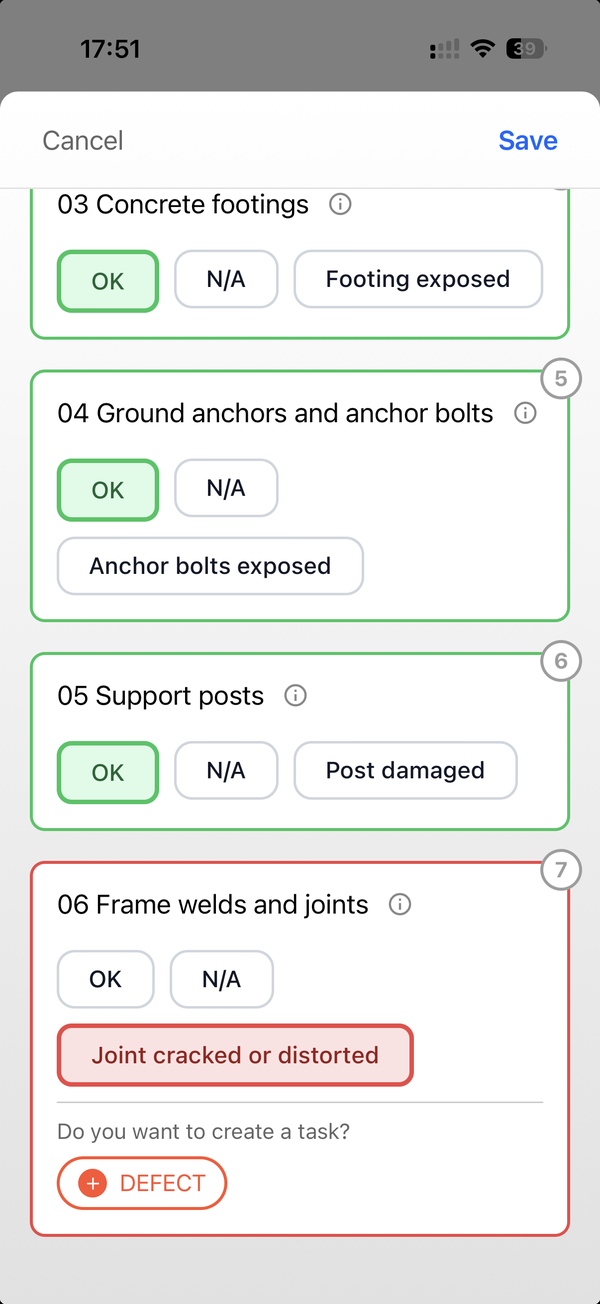
An operational check on a slide: each component in turn, with a failed weld ready to raise as a defect.
Turn annual inspection findings into repair work.
Civic.ly's Annual (Play Equipment) checklist records the outcome of your independent inspection for each item:
- Whether the inspection is in date, due soon, overdue or missing.
- Whether the report is on file.
- The inspector's risk rating.
- Whether findings have been actioned or remain outstanding.
Your team enters this from the report. The independent inspection itself stays with your inspector. View the annual checklist.

A quick visual check. Any failed item offers to raise a defect; the inspector decides.
For each repair in the report:
- Record a defect against the affected asset, with a photograph and priority.
- Create linked jobs for the work needed, such as getting a quote, ordering parts and carrying out the repair.
- Assign the jobs to staff or contractors, set due dates and track progress.
- Mark each job Done and add a photograph of the finished work.
- Review the result and mark the defect Fixed once you are satisfied.
See recording defects, repair jobs and completion evidence and how the records connect.
The RoSPA report is 100 pages. Someone has to sit and turn that into action items.Council clerk, from one of over 200 conversations with councils
Find inspection and repair evidence when your insurer asks.
Open any asset and its Tasks tab shows every inspection, defect and job recorded against it. Dates, assignees, checklist answers and photographs show what was checked, what was found and what was done about it.
It is a dated history of the work, which is what most evidence requests ask for. Civic.ly shows who created and last updated each record; it does not keep a field-by-field change log or a separate completed-by field. See what record history is kept.
Check what your insurer needs, including whether each item must be inspected individually. The record is only as complete as the checks your team carries out and enters.

Inspections, defects and jobs in one task list, each with its own status and photograph.
Close gaps in playground asset records ahead of AGAR.
Civic.ly gives you a mapped asset register and lets you flag the assets included in your AGAR asset register, so the clerk can see exactly which playground equipment the council manages and what records sit against each item. Asset register and AGAR definitions.
For an internal audit, use the register alongside inspection and repair histories to find missing assets and inspection gaps. These are operational records: they do not recreate missing historical evidence, and the financial and governance work for the Annual Governance and Accountability Return stays with the council.
Starting from scratch? See why councils move from spreadsheets and paper.
Bring staff and contractors into the same workflow.
Unlimited users are included, so your clerk, grounds team and contractors all work in one system. Invite them, then set access with permission templates or custom settings.
The Field Operative template limits tasks to those a person created or was assigned, while still letting them view all assets. Check permissions before inviting a contractor who needs tighter access.
See adding team members and managing permissions.
Frequently asked questions
Which software can help us follow up defects from an annual playground inspection?
Civic.ly lets your council record defects from an annual (for example RoSPA) inspection report against each playground asset, create linked repair jobs, assign the work and record completion photographs. Staff review the repair before marking the defect Fixed. See the repair workflow.
Can Civic.ly provide an auditable record for our insurer?
Yes. Each asset keeps a dated history of its inspections, defects and repair jobs, with assignees, checklist answers and photographs, which councils use to answer insurer evidence requests. It is a record of the work rather than a field-by-field change log, so confirm what your insurer needs. Read about record history.
Can Civic.ly help address asset register and inspection gaps ahead of AGAR?
Yes. Civic.ly's asset register and AGAR flags support an asset review, and linked task histories show where inspection records are missing. Your council still resolves the gaps and completes its separate financial and governance work. See the AGAR definition and linked task records.
Does Civic.ly replace an independent annual playground inspection?
No. The Annual (Play Equipment) checklist records the inspection status, whether the report is on file, the inspector's risk rating and whether findings have been actioned. The independent assessment remains separate. View the checklist.
Does a failed inspection automatically create a defect?
No. A failing checklist answer offers the inspector the option to raise a defect. The inspector chooses whether to create it, and the inspection result is kept either way. See how inspections and defects connect.
Can contractors access their repair jobs?
Yes, with permissions set by the council. Review both task and asset access: the Field Operative template limits tasks to those a person created or was assigned, but can see all assets. Check the permission settings.
See how it would work for your playgrounds.
Bring an example inspection report to your demo. We will show you how to record a finding, assign the repair and review the evidence against the asset.